Social media and your ID goals

The limitations and disadvantages of using social media are especially obvious when poor planning or imprudent word choice leads to legal suits, firings, divorces, laughs on late-night comedy, politicians losing the public trust, and more, all because someone did not think before they posted. The saying that a carpenter should “Measure twice, cut once” should be applied to posting, in “Think twice—thrice, or more—then post.” A genie can’t be put back into the bottle after it is let out, so any comment or posting that you make online, whether done in an “on or off” professional attitude, can’t be undone.
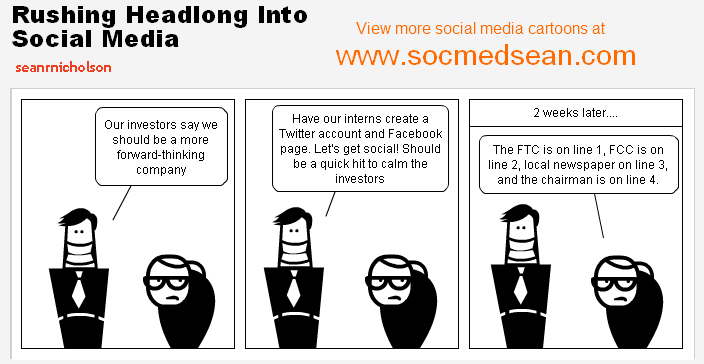
Cartoon Image with 2 executives discussing social media without considering the consequences

SEAN R. NICHOLSON © COPYRIGHT 2012 SOCMEDSEAN
http://www.socmedsean.com/cartoon-rushing-headlong-into-social-media/

Avoiding this kind of trouble has layers beneath its surface: even when posting in a professional capacity—for example, posting comments as an editor on an editor’s forum—you can easily be misunderstood or forget to put yourself into the shoes of the audience or say something that has rhetorical implications that you did not realize at first. A quickly turned-out comment or posting might have negative consequences to you professionally if you don’t take the time to read (and reread) what you have written before you post.

Just like in all writing, you must analyze your posting according to: audience, tone, point of view, voice, vocabulary, grammar, and so on. Obviously, you should reflect your professional sound judgment by bias-free word usage, no typos, good graphics, etc. in all your social media interactions.

However, having said all that, posting on forums, commenting on blogs, tweeting, and using other interactive social media are great ways to make professional contacts, provided you understand the forum and its audience, and provided you contribute value to the discussion (i.e., where the audience values your contribution as much as you do). I personally have made some good professional editing contacts by judiciously posting on LinkedIn discussion forums about things within my sphere of expertise.

With that as a foundation, here is a major way that social media could support your ID goals: your social media comments can place your site and message within a context of the shared space of the whole professional community and its messages. In other words, use of social media gives you opportunities to project yourself both thoughtfully and with discretion and precision to impress an audience of users or at least increase your visibility. These users make up your target audience. Social media use helps you to keep up with your profession as it changes, as you follow those resources—whether individuals, publications, businesses—that let you in on cutting edge topics and new technologies, online spaces, discussions, problems, solutions, and change-leaders; social media use also lets you represent yourself or your business professionally.

You show your ability to contribute value to these discussions as you enter the shared space of your professional community, and then, you continue to update yourself as the space grows and changes. You link to what will benefit you and link others to that benefit; you update continuously to change along with the changes that are continuously happening around you.

—Susan LaVelle

Conventions in Information Design

What are Conventions?

A convention is a “rule, method, or practice established by usage.” *

In Information Design, conventions refer to what users expect from previous experience reading documents and/or using websites.

We encounter design conventions every day, on almost everything we read. The designers of web pages, billboards, and even food packaging take advantage of conventional placement and type hierarchy to supply information in a way users will understand.

Examples of Conventions:

Document Design Conventions:
Headings located at the top of relevant text sections in large font
Page numbers located at the bottom of each page
Image captions located beneath relevant image in small font

Web Design Conventions:
Logo located in the top left corner of the page
Search box located on the homepage
Links change color when clicked

Why are Conventions Important?

Every design is a conversation between a designer and a user.

By making use of conventions, designers take advantage of the experience users have had browsing other websites. By showing new users something they’ve already seen, designers create an immediate sense of familiarity in the user.

If a designer places headings, navigation, and search boxes where users expect to find them, the cognitive workload of the user is reduced. This allows users to concentrate on what a designer is trying to convey in a website or document, rather than how to navigate it.

Violated Conventions:

Designers should not violate convention thoughtlessly or in a way that creates more work for users. Otherwise, users can go elsewhere.

However, there are not hard and fast rules in design. Some designers make a conscious choice to break convention and it can be successfully done. The key is to be mindful of the cohesive power of conventions.

—Catherine Krecke

*www.mdictionary.com/definition/convention

Controlling your Home Page: The Designer as “Smothers’ Mother”


Image of Record Album cover, Smothers Brothers, "Mom Always Liked You Best!" with one brother having an overabundance of gifts on his side and the other brother only having a chicken.

© Smothers Brothers All rights reserved.
http://www.smothersbrothers.com/albums/smo05sm.gif
Accessed on December 5, 2013

Deciding what to feature on a “Home Page” is challenging. Bringing organization stakeholders to participate in that discussion can make this even more complex. Multiple perspectives provide information, but too often disparate stakeholder agendas enter the discussion. Similar to Tommy and Dick Smothers’ mother, a designer for an organization page cannot usually accommodate all interests equally. Consequently, designers can face conflict or resentment over who gets picked for Home Page “top billing.” By being aware of this risk, and by taking early steps to address it, designers can diminish the effects of unproductive stakeholder agendas.

(1)    Steve Krug, in “Don’t Make Me Think – A Common Sense Approach to Web Usability,” emphasizes that above all, the designer must have a concept of “the big picture” that drives the Home Page content. Krug cautions against adding any Home Page content that distracts from a big picture of “what the site is.” Developing and communicating that picture sets the context for development decisions of what to include.

(2)    Explain to stakeholders that the purpose of the home page is to deliver the user to the featured (stakeholder) content pages, not to establish a hierarchy of worth.

(3)    Establishing and following systematic decision-making processes helps to legitimize organizational decisions on Home Page content.

(4)    Communicating that process to stakeholders before making decisions should lead to better control of Home Page content.

Thankfully, Smothers’ mother did not follow this advice, leading instead of one of the funniest comeback lines in comedy. For an information design, however, designing a purposeful and productive Home Page requires us to be kind to all of our “children” by considering and addressing organizational stakeholder interests.

—Brian Wyneken